 Tap AAC
This guide doesn’t rank apps. Every person is different, and the right app for one person can be wrong for another. Instead, here are the questions worth asking about any AAC app, including ours.
Before you look at apps
- Get an AAC assessment if you can. A speech-language pathologist matches a person’s skills and needs to the features of an AAC system. The features they weigh include the type and number of symbols, the display, how the person selects, the voice, positioning and accessories such as mounts or switches, portability, room to change over time, the user’s own preference, and cost and upkeep.1 See what happens in an AAC evaluation.
- Write down what the person needs to say. Requests are only the start. Think about chatting, joking, asking questions, saying no, telling news, saying how they feel, and talking about the things they love.
- Write down where. Home, school, the car, the bath, the playground, a noisy dining hall, outdoors in bright sun.
- Think about the body. Can the person tap a small button accurately? Do they need bigger buttons, settings for unsteady hands, a switch, or their eyes? Our guide to AAC and cerebral palsy explains the ways to choose.
- Find out about funding and loans. Some AAC tools are covered by insurance and some aren’t; an SLP can help.2 In the US, every state and territory has an Assistive Technology Act program, and their directory lists device loan and demonstration services, so you may be able to try devices before you buy.3 For a school-age child, see AAC at school; for Medicaid, Medicare and insurance, see how to get an AAC device.
Questions about the words
- Does it have words to grow into, not only requests? Look for core words (I, want, more, not, what, go), describing words and question words as well as names of things. AAC vocabularies tend to be mostly nouns, and adding verbs and other kinds of words can increase how much AAC is accepted and used.1
- Can you add your own words, photos and recordings? Personal, meaningful words make it more likely that a person keeps using AAC.1
- Can the person build sentences, with word endings (play, played, playing) and a way to say the whole sentence?
- Is there a keyboard for spelling words that aren’t on a button, now or as reading grows?
- Does it suit the person’s age? A teenager or an adult needs pictures and topics that fit their life.
Questions about finding words
- Do buttons stay in the same place? When a word always lives in the same spot, the hand learns where to go. If adding words moves the others around, the person has to search again.
- How many buttons fit on a screen, and can you change it? Symbol size and the number of symbols on a display are set for each person.1
- How are the words organized? By topic, by kind of word, or as pictures of real scenes. Visual scenes (photos with spots to tap) may be easier to learn for beginning communicators.1
- Does every picture show its word? A written word with the picture helps partners understand it.1
Questions about the voice
- Is the voice clear and easy to listen to, including in a noisy room?
- Is there a voice that fits the person, by age, gender and language? Voice options can be limited, so listen before you buy.1
- Can you record a real voice on a button, for names, family sayings or a favorite phrase? Recorded speech sounds more natural but can only say what was recorded; synthesized speech can say new things.1
- Does it speak the languages used at home?
Questions about access
- Are there touch settings for unsteady hands, like holding to select, ignoring quick repeat taps, or speaking when the finger lifts?
- Does it work with switches (scanning) for someone who can’t touch the screen? With eye gaze?
- Can the person see it well? Contrast, dark mode, picture and text size.
- How will it be carried and mounted? A case, a strap, a stand, a wheelchair mount.
Questions about everyday life
- Does it work with no internet? Speech shouldn’t stop in the car, in a basement or on vacation.
- Can the tablet be kept in the app, so it isn’t swapped for games or closed by accident?
- Can you protect the settings, for example with a PIN, so pages aren’t changed by accident?
- How long does the battery last, and how will charging fit into the day?
- Can you print pages? A paper copy is a backup for the bath, the beach and flat batteries. See low-tech AAC.
Questions about your data
- Does it need an account or a sign-in? What happens if the account is closed?
- Where are the pages, photos and recordings kept: on the tablet, or on someone else’s servers?
- Can you back up everything to a file you keep, and restore it on a new tablet?
- Are there ads, analytics or tracking? Read the privacy policy before you set it up.
Questions about cost
- Is it a one-time price, a subscription, or free with paid extras? Add up the cost over three years.
- Is there a free trial, and is everything included in it?
- What happens if you stop paying? Can the person still talk? Can you still get your pages out?
- Which tablets does it run on? Some apps run on only one kind of tablet. If you move to a new tablet, does the purchase come with you?
- An app, or a dedicated device? A dedicated speech device can be covered as medical equipment; coverage of apps and tablets varies. See what is a speech-generating device.
Questions about support
- Is editing easy for parents, teachers and aides, not just the SLP?
- Is there help to learn it: guides, tours, examples, an email address you can write to?
- Who will set it up and keep it updated? Agree this before you buy. Poor training of communication partners is a known barrier to using a device.1
How to run a fair trial
- Pick three everyday moments, like snack, a game and getting ready to go out.
- Set up the words for those moments, including the person’s favorite things.
- Model in those moments every day for at least two weeks, at home and, if you can, at school.
- Keep short notes: what the person looked at, touched or said, and what was hard for you to set up or change.
- Ask the person. Their own preference counts, and so does whether the system makes them want to communicate.1
One short trial may not tell you enough. Success with a particular device may not be clear at the first assessment, and trying devices is often part of AAC therapy.1
Be careful of
- Any promise that an app will make a person talk.
- Apps that need the internet to speak.
- Words locked behind a subscription, with no way to back them up or take them with you.
- Set-ups so hard to edit that new words never get added.
Try this today
- Write down ten things the person would say tomorrow if they could.
- List the places they need to communicate, and anything that makes a tablet hard there, like water, sand or noise.
- Ask the speech-language pathologist which features this person needs.
- Choose the three everyday moments you’ll use for a trial.
More AAC guides
- What is AAC? A plain-language guide for familiesWhat the letters mean, the kinds of AAC, who uses it, and six first steps.
- Low-tech AAC: choosing and using boards, books and cardsBoards, books and cards with no batteries: which to choose, and how to use them every day.
- AAC and cerebral palsy: touch, switches, eye gaze and partner-assisted scanningWays to choose when pointing is hard: touch, switches, eye gaze and partner-assisted scanning.
- AAC at school: how teachers can support a student who uses AACModeling in lessons, wait time, better questions, classmates, and the IEP.
- How to add a free board to Tap AAC (and other apps that open .obz files)Download the board file on the tablet, import it from the Page library, and find the new page.
Sources
We read each of these on October 12, 2026. Numbers in the text point to them.
- American Speech-Language-Hearing Association. Augmentative and Alternative Communication (Practice Portal). Professional guidance for speech-language pathologists. Accessed October 12, 2026.
- Communication Health Support Association, powered by the American Speech-Language-Hearing Association. Augmentative and Alternative Communication (AAC). Information for the public. Accessed October 12, 2026.
- National Assistive Technology Act Technical Assistance and Training (AT3) Center. AT Act Programs (directory of state and territory programs). Accessed October 12, 2026.
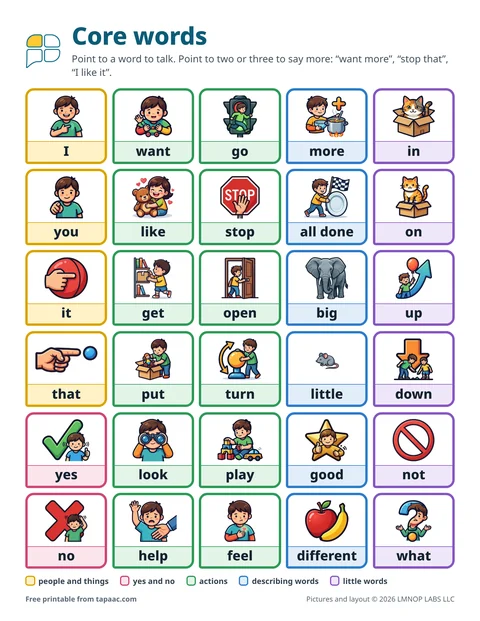 Core word board
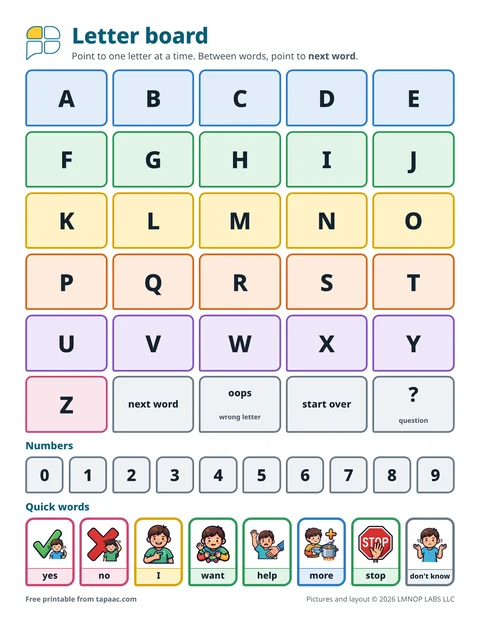 Alphabet board
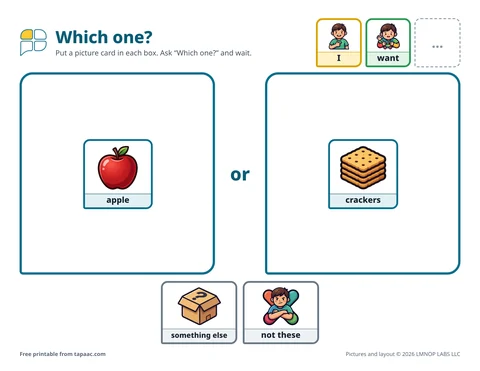 Choice boards
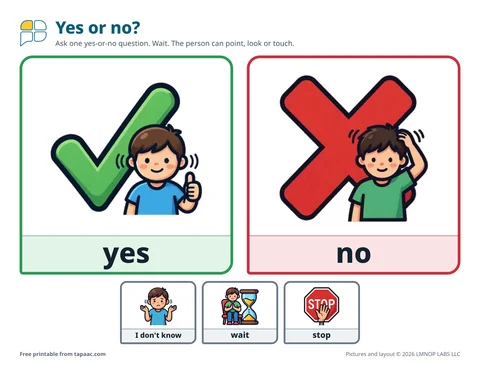 Yes and no board