Work on the same book as the family
In Tap AAC the family owns the book. When they invite you, you can change it from your own tablet or phone, or from a computer at tapaac.com/app, where you also keep goals with session data and notes. Being invited and signing in are free.
How it works
From an invite to the same book, in three steps
-
The family invites you
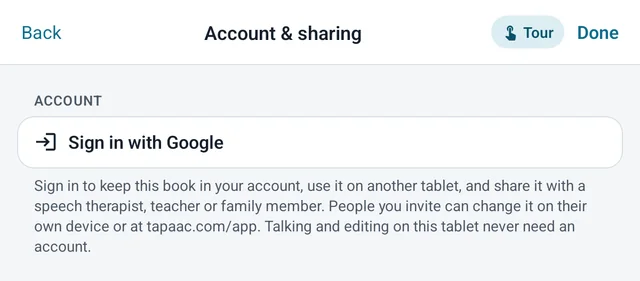
The parent (or an adult who uses AAC) signs in with Google in the app and puts the book in their account. They invite you with a one-time code from the app, or with a link, a QR code or a printed card from the web app.
-
You join
Open the link, scan the QR code with your phone, or go to tapaac.com/app and choose “Join with a code or link”. Sign in with Google, check who invited you, and join.
-
You work on the same book
Change a button on the web and the tablet gets it within seconds; changes made on the tablet show up on the web. Goals, session data and notes sit beside the book for the whole team.
The web app
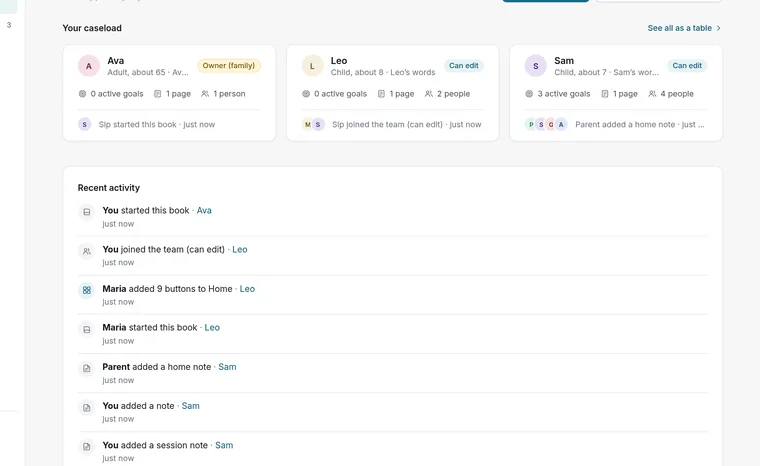
Your caseload, on a computer
tapaac.com/app is where therapists, teachers and families work on a book together.
- People: your caseloadEveryone whose team you are on, with their active goals and the last change.
- Board editorThe person’s pages and buttons in a tablet frame. Change a button, a picture or a word, and print a page.
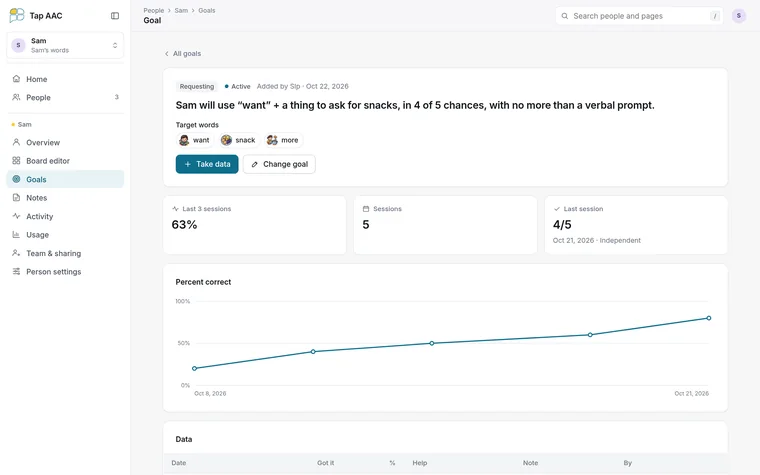
- Goals with dataWrite goals with target words. After a session, take data: chances, how many they got, and the most help needed. Each goal shows a chart.
- NotesSession notes, observations and home updates. Each note says who can read it: the whole team, owner and editors only, or only you.
- ActivityWho changed what, and when.





Goals and notes
Data the whole team can see
Goals and their data are seen by the whole team, so a parent sees the same chart you do. Keep clinical notes as “only me” or “owner and editors only”.
- Target words on each goal
- Chances, correct and the most help needed
- A chart for every goal
- Notes with who can read them
In the app
Tools for the therapy session
These work on the tablet itself, with or without an account.
-
Modeling
Show words on the person’s own board and they speak, without counting as the person’s own words in the diary.
More › Modeling
-
Word finder
Search any word to see the way to it; the next button glows, step by step, so you can model the path.
Book menu › search
-
Vocabulary Builder
Show 12, 24, 36 or all 48 core words, or pick them. Hidden words keep their space, so motor plans don’t move.
Page options
-
Word Guesses
A talking next-word screen that learns how the person talks once about 200 words have been said. Words you model are never learned.
Page library › Books
-
Word diary and word report
Each word said, with the time, kept on the tablet; the last 30 days of the person’s own words and the most used ones. On to start, easy to turn off.
Settings › Word diary & reports
-
Vocabulary check
Reads the book: different words, which core words are there and how many taps each takes from Home, kinds of words, and where every word is. It suggests; it doesn’t score.
Settings › Word diary & reports
-
A report for the therapist
The vocabulary check and the diary’s last 30 days, printed or saved as a PDF.
Settings › Word diary & reports
-
Access settings
Switch scanning with one or two switches, hold to speak, pause before repeat, speak when the finger lifts, high contrast and reduced motion.
Settings › Touch & switches
-
Bring your own boards
Open Board files (.obf and .obz) become new pages, and any page can be shared back out as .obz.
Page library
-
Reset a page
Put a ready-made page, scene or printable back to how it came after a session’s changes. It asks first, and Undo works.
More › Page options › Reset
Who can do what
The family stays in charge
The owner chooses what each person can do, can change it at any time, and can remove anyone. Anyone who isn’t the owner can leave a team.
| On the team | Owner (family) | Can edit | Can look |
|---|---|---|---|
| See the board, goals and team notes | Yes | Yes | Yes |
| Change buttons and pages | Yes | Yes | No |
| Add goals, take data, write notes | Yes | Yes | No |
| Invite people, change roles, remove people | Yes | No | No |
| Rename or delete the book | Yes | No | No |
“Can edit” suits a speech therapist or a parent. “Can look” suits a teacher, an aide or a grandparent.
Privacy
What is shared, and what isn’t
A child’s book belongs to a parent’s account, and a child never signs in. An adult who uses AAC can own their own book. When a family shares a book, the book’s pages, buttons, photos and recordings are kept in their account so the team can see them, along with the team’s goals, data and notes.
Settings, quick phrases, saved buttons and phrases, videos and recorded messages stay on each tablet, and the word diary never goes into the shared book. Tap AAC is a tool for communication and teamwork, not a medical-records system. The privacy policy has the details, including how to delete an account.
- No account needed to talk or edit
- Sign in only to share
- No ads, no analytics
- Delete the account at any time
Questions
Therapists often ask
Do I have to buy Tap AAC to help a family?
No. Joining a team and using the web app at tapaac.com/app are free. The family’s tablet needs Tap AAC: free for 30 days, then $29.99 once through Google Play. If you also put Tap AAC on your own device, it has the same 30-day trial.
Can I edit from my own tablet?
Yes. Sign in with Google in Tap AAC on your device (Settings, Account & sharing) and join with the family’s code. A change on one device reaches the others within seconds when online.
How long does an invite last?
A code from the app works once and runs out after 7 days. In the web app, the owner chooses how long a link lasts and, for some links, how many people can use it.
Which words are on the tablet to start?
A new tablet starts empty. The family, or you, add a vocabulary from the Page library: Tap Core (48 core words on one page), Word Guesses (a next-word screen that learns how the person talks), or Tap Chatter or Tap Core 60 (each a whole vocabulary in one book), plus ready-made boards, scenes and printable pages.
Does the web app show which words were used?
Not yet. Words used on the tablet are in the app’s word diary and word report, and in the report for the therapist you can print from the tablet.
Which devices does it run on?
Tap AAC runs on Android phones, tablets, foldables and Chromebooks with Android 8.0 or later, and works with a keyboard and mouse as well as touch. The web app works in a browser on a computer, a tablet or a phone.

Ask the family for an invite
Or try Tap AAC on your own Android tablet free for 30 days.