 Tap AAC
We make Tap AAC, one of the apps on this page; the built-in ways come first because they are free and already on many phones. What Google’s and Samsung’s features do is quoted from their own help pages, and app prices are from their store listings, all checked on October 30, 2026.
Which way fits
| You need to | Try | Speaks out loud in the room? |
|---|---|---|
| Say a few things once, face to face | Live Transcribe: Type, then Read aloud | Yes, when you tap Read aloud |
| Make or answer a phone call without speaking | Live Caption’s typed responses (Pixel 6 and later), or Bixby Text call (Samsung Galaxy) | No: only the person on the call hears it |
| Talk this way all day, for days or for good | A text-to-speech app or an AAC app | Yes |
| Talk when spelling is hard | An AAC app with pictures and word guesses | Yes |
Live Transcribe: type, then Read aloud
Live Transcribe is Google’s captioning app. It “is already installed on Pixel phones and select other Android phones”, and other phones can get it from Google Play.1 Its typing feature, in Google’s words:1
- Open Live Transcribe, and at the bottom of the screen tap Type.
- Type your message, then tap it to show it big on the screen, so the other person can read it.
- Tap Read aloud, or tap Volume up to play it through the phone’s speaker.
It’s quick and free, but it is a captioning app first: there are no saved phrases to tap, so every sentence is typed from scratch.
On phone calls
- Pixel: Live Caption, “Type responses during calls”. Google: “You get captions of what the other person says and you can type in responses in real time. Your messages are read aloud by the system.” It is available on the Pixel 6 and later; turn it on in Settings, Accessibility, Live Caption. Live Caption “doesn’t use mobile data or an internet connection”.2
- Samsung Galaxy: Bixby Text call. Calls are answered by an automated voice, you read the caller’s words on the screen and type back, and “the caller will only hear an automated voice”.3
Both speak into the call, not out loud in the room, so they don’t help at the doctor’s desk or the dinner table.
A text-to-speech or AAC app
For anyone who will type to talk for more than a few minutes, after surgery, with a voice disorder, when speech comes and goes, or for good, an app built for it saves a lot of effort. Look for:
- A big typing box and one large Speak button
- Saved phrases that speak with one tap: your name, “please wait, I’m typing”, “yes”, “no”, “thank you”
- Word guesses as you type, so you type fewer letters
- A voice that works without internet (see offline text to speech on Android)
- A way to show the words in large letters, for a noisy room or someone who can’t hear well
- Pictures, if typing or spelling is hard
 Please wait, I’m typing
 Yes
 No
 Thank you
 I need help
 Say that again
 Slower, please
 I can’t talk on the phone
Four Android apps people use this way, with what their listings say:
Speech Assistant AAC
A typing app with phrase buttons. It is free to download, and its extra features are one in-app purchase; the listing says “there is no subscription” and that the app “does not require an internet connection”.4
- Talks with Typing and phrase buttons4
- Runs on Android; iPhone, iPad and Apple Watch5
- Price (US) Basic version free; extra features $10.99 once on Google Play ($24.99 on the App Store)
- Without internet Yes: it “does not require an internet connection”
- Last update on Google Play Oct 23, 2026
TypingTalk AAC
A free typing app. Its listing offers a choice “between offline voices and Internet-powered voices that sound more natural”, so pick an offline voice for places without a signal.6
- Talks with Typing6
- Runs on Android, iPhone and iPad7
- Price (US) Free
- Without internet Your choice of offline voices or more natural internet voices
- Last update on Google Play Oct 23, 2026
Spoken
A typing app with word prediction and “a wide variety of natural-sounding voices”. Speaking is free; saved phrases and the lifelike voices are Premium, and new users start on a free Premium trial.89 Its best voices need the internet: offline, it switches to the phone’s own voice.10
- Talks with Typing with word prediction8
- Runs on Android, iPhone, iPad and Apple Silicon Macs11
- Price (US) Free to speak; Premium $12.99 a month, $99 a year or $249 for life on Spoken’s website. Store prices differ: its in-app purchases on Google Play run $6.49 to $249.9912
- Without internet Partly: its high-quality voices need internet; offline it switches to the phone’s own voice1310
- Last update on Google Play Sep 24, 2026
Tap AAC (ours)
Pictures and typing in one app. Its typing screen fills the screen, guesses the next word, and reads what you type in Bella’s voice, on the tablet, with no internet; Show puts the sentence across the screen in giant letters.14 For someone who only types, a typing-only app costs less.
- Talks with Pictures, typing and Word Guesses14
- Runs on Android phones, tablets and Chromebooks, Android 8.0 or later; no iPhone or iPad version15
- Price (US) Free for 30 days, then $29.99 once16
- Without internet Yes: its voice, Bella, is part of the app
- Last update on Google Play Oct 24, 2026
Make it faster to use
- Put the app on the home screen, in the dock, so it is one tap away.
- Save the phrases you say most before you need them: people’s names, your address, what you need the nurse or the shop assistant to know.
- Set the speech rate in the app, or in Settings, Accessibility, Text-to-speech output if the app uses the phone’s voice.17
- Keep a pen and paper, or a printed alphabet board, for when the battery runs out.
More help choosing
- Offline text to speech on AndroidInstall a voice on the phone, choose the engine, and test it in airplane mode.
- Apps for trach, ventilator and surgery patientsWhen a breathing tube, a trach, surgery or voice rest takes the voice for a while.
- AAC apps for adultsTyping apps for ALS, pictures and phrases for aphasia, and apps that suit autistic adults.
- How to choose an AAC appThe questions to ask about any app, and how to run a fair trial before you pay.
Sources
Read on October 30, 2026. Google Play listings are named by app ID (the “id=” in their web address).
- Google. Use Live Transcribe (Android Accessibility Help). Google’s own help page. Accessed October 30, 2026.
- Google. Use Live Caption (Android Accessibility Help). Google’s own help page. Accessed October 30, 2026.
- Samsung. Use the Text call feature on your Galaxy phone. Samsung US support page. Accessed October 30, 2026.
- Google Play. Speech Assistant AAC listing (nl.asoft.speechassistant). Price, in-app purchases, last update and listing text, United States, checked October 30, 2026.
- Apple App Store. Speech Assistant AAC. Price, last update and listing text, United States, checked October 30, 2026.
- Google Play. TypingTalk AAC Text-to-Speech listing (com.miyanour.speechassist). Price, in-app purchases, last update and listing text, United States, checked October 30, 2026.
- Apple App Store. TypingTalk AAC. Price, last update and listing text, United States, checked October 30, 2026.
- Google Play. Spoken – Tap to Talk AAC listing (com.spoken.app). Price, in-app purchases, last update and listing text, United States, checked October 30, 2026.
- Spoken. Spoken Premium vs. free. The maker’s help page. Accessed October 30, 2026.
- Spoken. What is a fallback voice?. The maker’s help page. Accessed October 30, 2026.
- Spoken. Will Spoken work on my device?. The maker’s help page. Accessed October 30, 2026.
- Spoken. Does Spoken cost anything?. The maker’s help page. Accessed October 30, 2026.
- Spoken. Do I need to be connected to the internet to use Spoken?. The maker’s help page. Accessed October 30, 2026.
- Tap AAC. Everything Tap AAC does. Our own feature list for the version on Google Play.
- Tap AAC. Support. Our own answers about devices, backups and the internet.
- Google Play. Tap AAC listing (com.tapaac.app). Price, trial and listing text, checked October 30, 2026.
- Google. Use text-to-speech output (Android Accessibility Help). Google’s own help page. Accessed October 30, 2026.
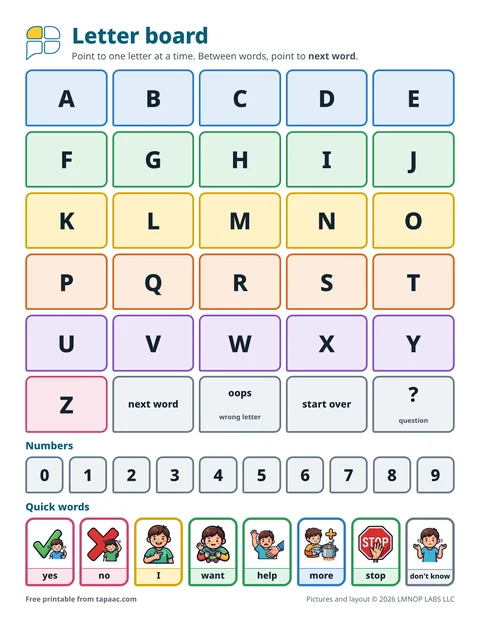 Alphabet board
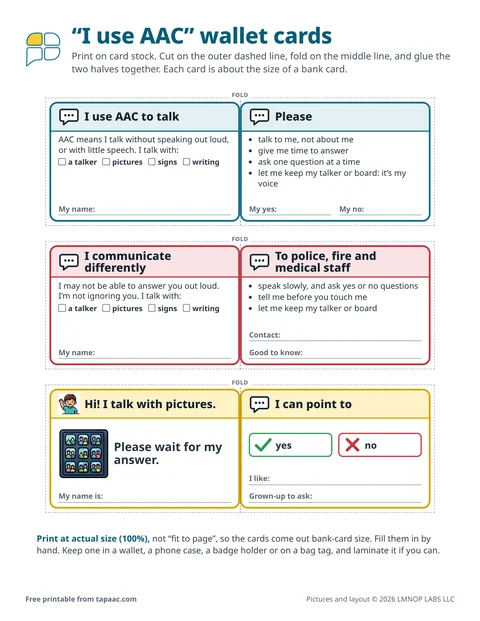 Nonverbal communication cards
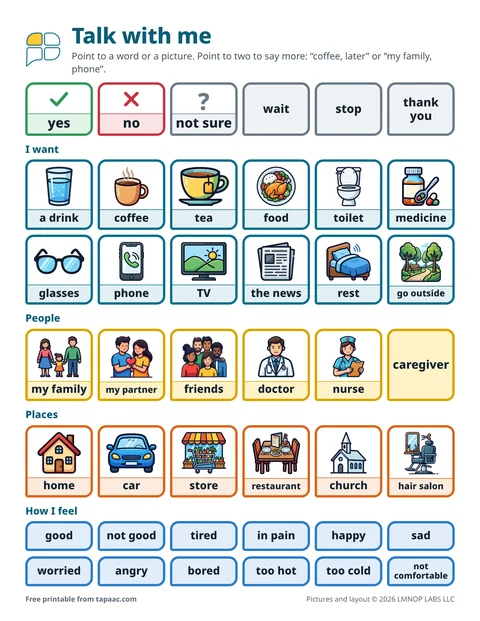 Communication board for adults